Never miss your free gift from the COD:M store again
The store has a gift waiting for you every day, but you have to collect it yourself. That's exactly what the bot takes care of. Enter your UUID once, and it handles the rest.
In three steps
Setup takes less than a minute
You don't need an app or a password. Your player UUID is enough.
Register
Type /register <uuid> in the chat. The game shows your UUID in its settings. Enter it once, that's it.
Get verified
The bot opens the store and checks whether the UUID actually exists. While it's there, it also reads your name, level, and rank.
Sit back
That's it. From now on, it collects your gift every night as soon as the next one is ready. It can send you a DM about it if you want.
Features
What you get out of it
No day goes to waste
At midnight UTC the next gift is ready. Shortly after, the bot shows up and works through all accounts one by one while you sleep. If you just joined, you don't have to wait that long. It usually collects today's gift within a minute.
No admin needed
One /register and you're in. Nobody has to approve you, and the bot never asks for login details anyway.
The season gift too
Besides the daily one, the store adds a second free gift every season. The bot picks it up in the same run, once per season, and /status shows you whether it's already been collected.
Your profile at a glance
Your name, level, and rank show up as a card in the chat, along with your in-game image. The color matches your rank.
You decide what you hear about
Some people want to know about every claim, others only want to hear when something goes wrong. You set that up with /notify. Or just stay quiet.
Name changes get noticed
If someone changes their in-game name, the bot posts it in a channel of your choice. If you'd rather not show up there, use /privacy.
You decide what's visible
The bot asks right at registration whether you want to show up in the lists. You can change that anytime. Depending on the server settings, it shows other people's UUIDs only as …95F.
Show your profile in chat
With /share you post your card publicly in the channel. You'll see a preview first and decide yourself whether your UUID stays visible or gets masked.
Who else is playing?
/members lists everyone who's registered, along with level and rank. Use /ingame to take a closer look at a single profile.
What it looks like in Discord
Here's what that looks like
Whether at registration, with /status, or when you show your card in chat with /share: you always get this card back, with your in-game profile as an image.
You don't need to upload anything. The bot fetches the image itself and keeps it current.
…789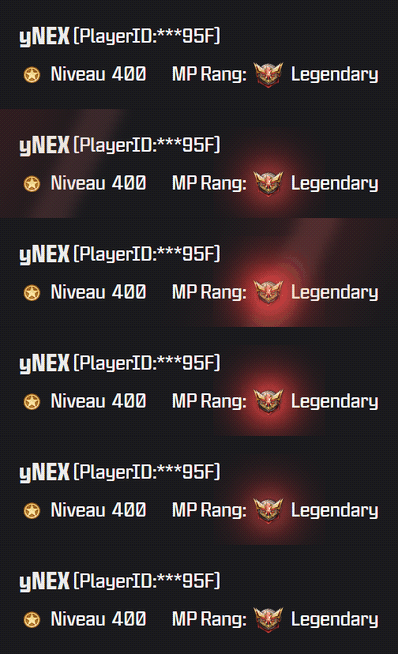
Command overview
All commands
You handle most of it yourself. What's at the very bottom is reserved for the bot's operator.
/register <uuid>Register an account — the bot validates it live in the store/statusProfile card per account: what's been collected and when the next one is due/ingame [@user]View an in-game profile — your own or a member's/membersAll visible accounts on the server/sharePost your own profile card publicly (with/without UUID)/notifyClaim DMs: off · errors only · everything — for all accounts or just one/privacyShow up in lists — for all accounts or just one/uuidconsentView & revoke UUID permissions/unregisterRemove an account/aboutInfo & links about the bot/setupSet up channels, visibility & role in a dialog/setnamelogSet the channel for the name log/clearnamelogRemove the name log channel/setvisibilityUUID visibility: everyone · role · consent/setverifiedroleVerified role for full visibility/claim nowQueue one account immediately/claim allQueue all accounts (with confirmation)/resetReset an account's claim status/reset-allReset all accounts' claim status/queueView queued commands/syncSync slash commandsTrust & privacy
What happens to your data
Masked UUIDs
Instead of your UUID, others only see …95F, unless your server allows more or you grant access yourself. The bot always shows you your own in full.
No login details
The bot only needs your player UUID. It will never ask for a password, and it never gets into your account.
Leave anytime
/privacy takes you out of all lists. /unregister deletes your registration along with every permission you've granted.
No full access to the server
When invited, the bot only gets the permissions it actually needs. Administrator isn't one of them.
Changes
What's been worked on recently
The bot keeps getting updates.
Here's what's been added most recently.
-
September 19, 2026
- Fixed
/sharesometimes showed “did not respond in time” instead of opening the preview — mostly the first time after a restart.
- Fixed
-
September 13, 2026
- NewWhen an event is running, its free gift is claimed the fast way too — and the notification shows its own picture for each gift.
- NewThe claim message is easier to read when you have several accounts — and shows several preview images when there were several gifts.
- NewThe claim message now shows what was in the gift — with its name and a small preview image. At weekends you can also see that you got twice the amount.
- NewThe animated profile card has stronger rank colours, starts calm and fades out faster — and got smaller in the process.
- FixedWhen an event with an extra free gift is running, it is reliably collected again — the fast path had been missing it.
- NewThe glow on the animated profile card now sits behind the rank badge instead of on top of it — the emblem stays clearly visible, and the pulse swells more gently.
-
September 12, 2026
- FixedThe glow on the animated profile card now sits exactly on the rank badge instead of a few pixels off.
- NewThe nightly run now collects the gifts without going through the browser — and your profile card is rebuilt every night instead of being photographed in the store.
- NewProfile cards can now be animated — a light sweeps across and the rank badge glows. The rank colours also match the game now: gold belongs to Grand Master, not Elite.
- NewThe profile picture on registration now takes under a second instead of nine — the bot builds the card itself instead of photographing it in the store.
- FixedOwner commands now run within ten seconds instead of thirty — and the confirmation quotes the right wait time.
This list is generated from the version history at publish time. It only covers what you notice in Discord — work on the plumbing stays out.