A look under the hood
Before you let a bot onto your server, you probably want to know what it actually does there. That's exactly what this page explains. What matters to you as a server owner comes first, and the technical underpinnings for anyone who wants the full picture follow further down.
Permissions
What permissions the bot gets
When you invite it, Discord asks for exactly six permissions. Administrator is deliberately not one of them, and that's not a small detail. With admin rights the bot could post in channels it's not actually supposed to. Without them, it can't even try.
/share also works in threadsWhat it can't do with them
Discord decides who can use the setup commands based on your server roles: /setup and the other configuration commands require the "Manage Server" permission. Commands like /reset or /queue can only be run by the bot's operator, not by a server owner.
For server owners
Who can see your members' UUIDs
This is the most important decision you make for your server. A player UUID isn't a password, but it can be used to recognize someone across different servers. That's why you can decide how much of it strangers get to see.
Good to know: without any setting from you, the open level applies. If that's too much, change it right after inviting the bot with /setup.
Every member of the server sees the full UUID. Convenient, but it means the UUID can also be found outside your server.
Regardless of the level
Everyone always sees their own UUID in full. And anyone who hides via /privacy doesn't show up in any list.
This is what another member sees
…789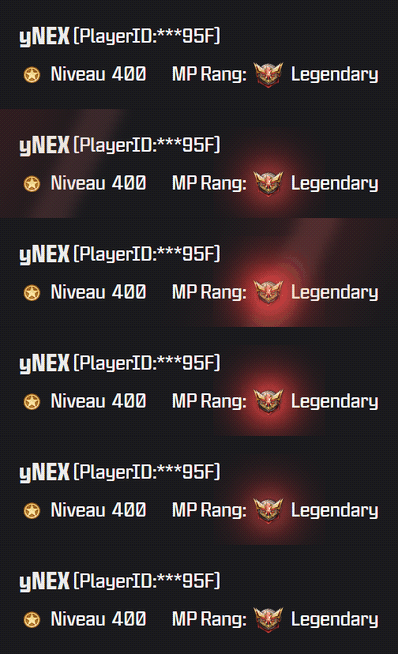
Honestly
Where the bot hits its limits
The store doesn't offer an official interface. That's why the claimer drives a real browser and clicks through it like a human would. That works reliably, but it has quirks you should know about beforehand.
- If the store changes its look, the code has to followIf a button gets renamed or moved, the flow can run into a dead end until the code is adjusted. Errors land in the log, and the operator gets notified.
- The bot speaks GermanIts replies, profile cards and DMs are in German only. This page is translated, the bot itself is not. The example card above shows what you actually get.
- Only the free giftsThe bot only touches cards that cost nothing: the daily gift and, while one exists, the gift of the current season. It doesn't buy anything, redeem codes, or do anything else in the store.
- Automation remains a grey areaActivision doesn't offer an interface for this and doesn't comment on it either. A residual risk can't seriously be ruled out. If you don't want to take it, you can still collect your gift by hand.
- Registrations are throttledEvery check is a real visit to the store. That's why at most two run at the same time, and across all users combined it's at most 40 in 10 minutes. If there's a rush, you get a short message and can try again a little later.
Step by step
What happens when someone types /register
There are four stations between hitting submit and the finished profile card. Click through to see what's checked at each one.
Does this even look like a UUID?
First, the bot just looks at the characters. A player UUID is 15 to 20 digits, nothing else. If you typo it, you get told right away.
This check costs nothing and doesn't need a browser. It filters out typos before anything expensive begins.
Does the UUID already belong to someone?
Each UUID can only be registered once. Whoever enters it first owns it. If someone else tries the same UUID later, the bot rejects it.
In the same step, it counts how many UUIDs are already running on the Discord account. At ten, it stops, so no one can block the queue for everyone else.
Does this player actually exist?
From here on it needs a real browser. The bot opens the COD:M store and enters the UUID there. Only if the store then shows a profile is the UUID real.
Whatever's on screen at that point, it reads along right away. Name, level, and MP rank end up on your profile card this way, and it grabs an image of it too.
Because this step is a real request to the store, there are three brakes on it: at most 2 checks at the same time, a 30-second cooldown per person, and a cap of 40 checks in 10 minutes across all users. If the cap is reached, the bot says so openly and asks you to try again later.
Save and go
Only now does it get saved. The bot checks the reservation a second time, because the store visit happened between step 2 and step 4, and in that time someone else could have been faster.
After that the profile card comes back, and the bot collects today's gift right away, so you don't have to wait until the next night. On your first ever registration, it asks two more things one after another: whether you want to show up in the server lists, and whether you want notifications. Both can be changed later at any time.
The architecture
Why it's two programs instead of one
The Discord bot and the part that collects the gifts are two separately running programs. They never talk to each other directly. Instead, each one leaves behind files that the other reads.
The reason lies in the runtimes. A Discord command has to be answered within seconds, while a store visit takes noticeably longer. If both lived in the same program, every collection run would block the chat.
Operator commands take a detour through a mailbox
When the bot's operator triggers /claim all, the bot can't run that itself, because only the claimer is allowed to touch the collection history. So the bot drops the request into commands.json, numbered sequentially. The claimer remembers which number it last handled and only processes what's newer.
That's why the bot honestly replies to such commands with "queued" instead of "done." Nothing gets lost, but it only happens on the next run.
| File | Who writes it | What's in it |
|---|---|---|
| registrations.json | Bot | Which UUID belongs to which Discord account, plus the personal list opt-out and notification preference |
| profiles.json | Claimer | Last seen name, level, and rank, plus the history of name changes |
| state.json | Claimer | When an account was last collected and when it's due again |
| commands.json | Bot | The mailbox for operator commands, append-only, never deleted |
| server_settings.json | Bot | Per server: channels, visibility level, verified role, granted consents |
The schedule
What happens every night
The store resets the gifts for everyone at the same time, namely at midnight UTC. Two minutes later, the claimer wakes up and works through the registered accounts one after another. There's a pause of a few seconds between accounts, so everything doesn't hit the store at once.
For each account, it checks for both gifts. The daily one comes back every night, the season gift only exists once per event. It doesn't need to remember whether it's already been collected: redeemed cards are marked as such in the store, and it checks for that before every click. As long as the mark is there, it leaves the card alone.
After that, the claimer goes back to sleep. The Discord bot, on the other hand, stays online the whole time, since commands can come in at any moment.
If something goes wrong, for instance because the store isn't reachable right then, the claimer waits a while and tries again. The planned time stays untouched in that case, because an estimated time would be worse than none at all.
Still have questions? The command overview on the homepage shows what members and admins can each do.
🎁 Invite bot